Payment and invoices
You buy token packages and app licences right on the Billing page. Once you pay, the package activates automatically, usually within seconds. This page walks through each step and explains what to do when the money has left your account but the package has not arrived.
Each package's price is always shown on the Billing page. To understand tokens and packages before buying, see Tokens, plans and limits.
The screenshots show the Vietnamese interface. Button names are given in English first, then in Vietnamese in brackets.
How to pay
- Sign in at vieneu.io and click Billing (Thanh toán) in the left sidebar.
- Pick a package and click Get Payment QR (Lấy QR thanh toán). On the package you are already on, the button says Buy more (Mua thêm). When you hold a token package and pick a different one, it says Upgrade to This (Nâng cấp lên gói này).
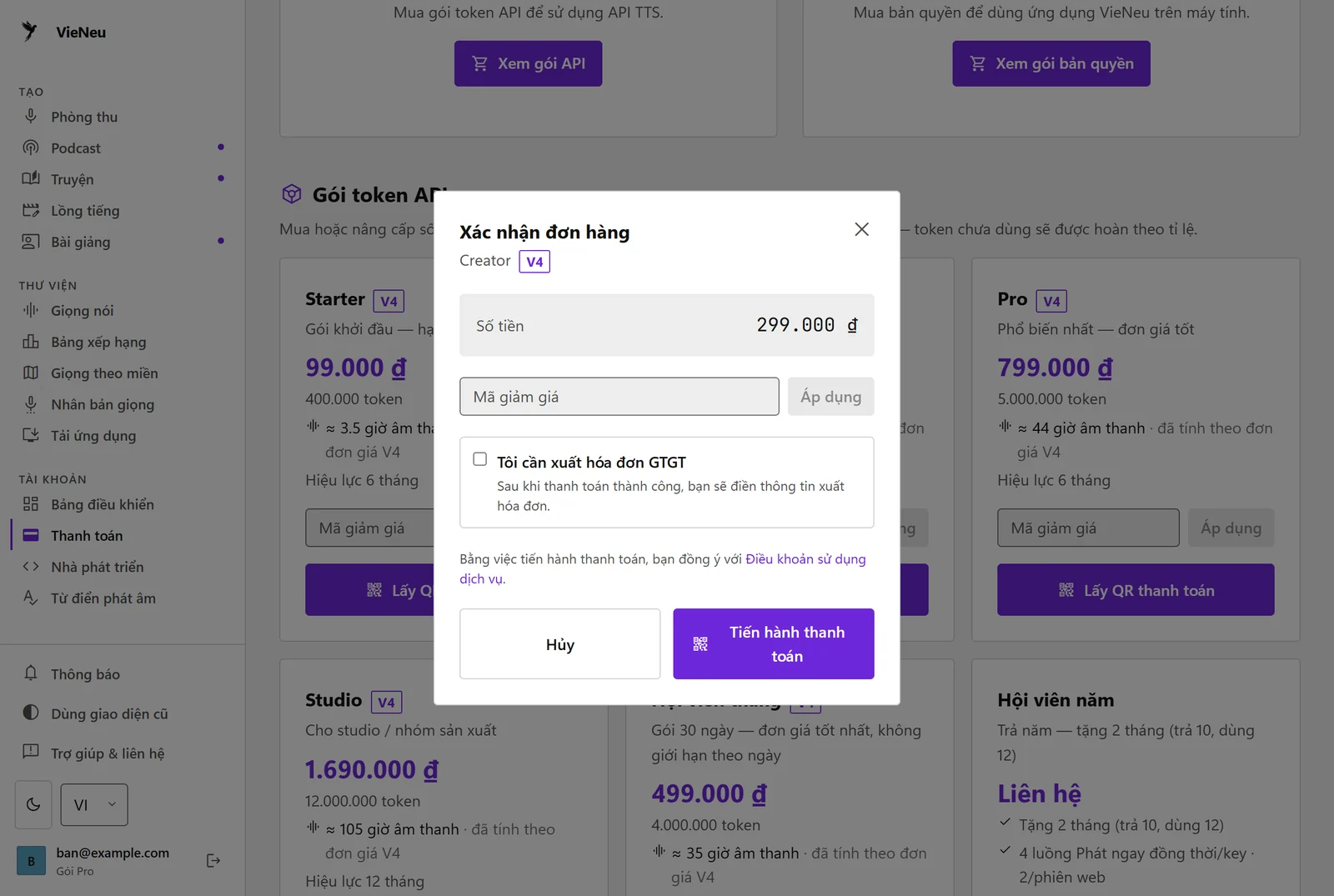
- The Confirm your order (Xác nhận đơn hàng) box opens. Check the Amount (Số tiền), enter a coupon if you have one, tick I need a VAT invoice (Tôi cần xuất hóa đơn GTGT) if you need one, then click Proceed to Payment (Tiến hành thanh toán).
- Your browser moves to SePay's payment page. Open your banking app and scan the QR code on that page. The QR code already holds the account number, the amount and the transfer description.
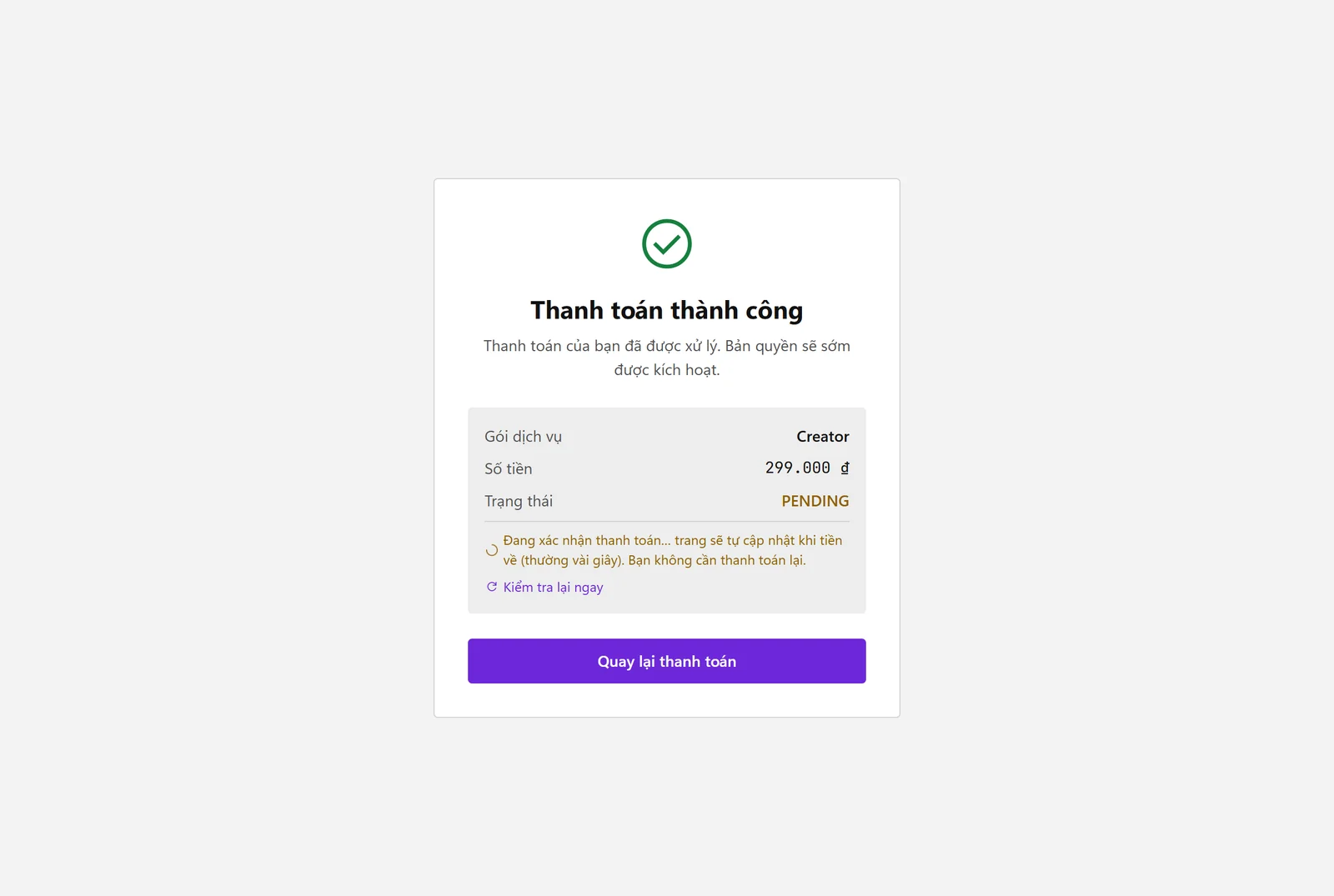
- Once the transfer is done, you are sent back to VieNeu. The Payment Successful (Thanh toán thành công) page says your tokens have been credited. If it says Confirming your payment… (Đang xác nhận thanh toán…), keep the page open: it updates by itself once the money lands. There is no need to pay again.
If you type the transfer yourself instead of scanning, copy the exact amount and the exact transfer description shown on SePay's page. The system matches your payment on those two. Do not round the amount, even when a discount leaves an odd figure.
Payment methods and paying from abroad
- Vietnamese bank transfer (Chuyển khoản ngân hàng Việt Nam): scan VietQR or transfer on SePay's page. This needs a bank account in Vietnam.
- International card Visa / Mastercard / JCB (Thẻ quốc tế Visa / Mastercard / JCB): available only when the Confirm your order box shows a Payment method (Phương thức thanh toán) choice with this option. You enter your card on SePay's secure page. You are billed in VND and your card issuer converts.
VieNeu does not take PayPal, Apple Pay or foreign e-wallets. If you are abroad, have no Vietnamese bank account, and the confirm box offers no international card, message the VieNeu team through the support button.
Businesses that need a custom quote, or a package marked Contact us (Liên hệ): click Contact to Buy (Liên hệ mua gói) on that package's card.
You paid but the package did not activate
A package usually activates within seconds of the money landing. If you do not see it yet:
-
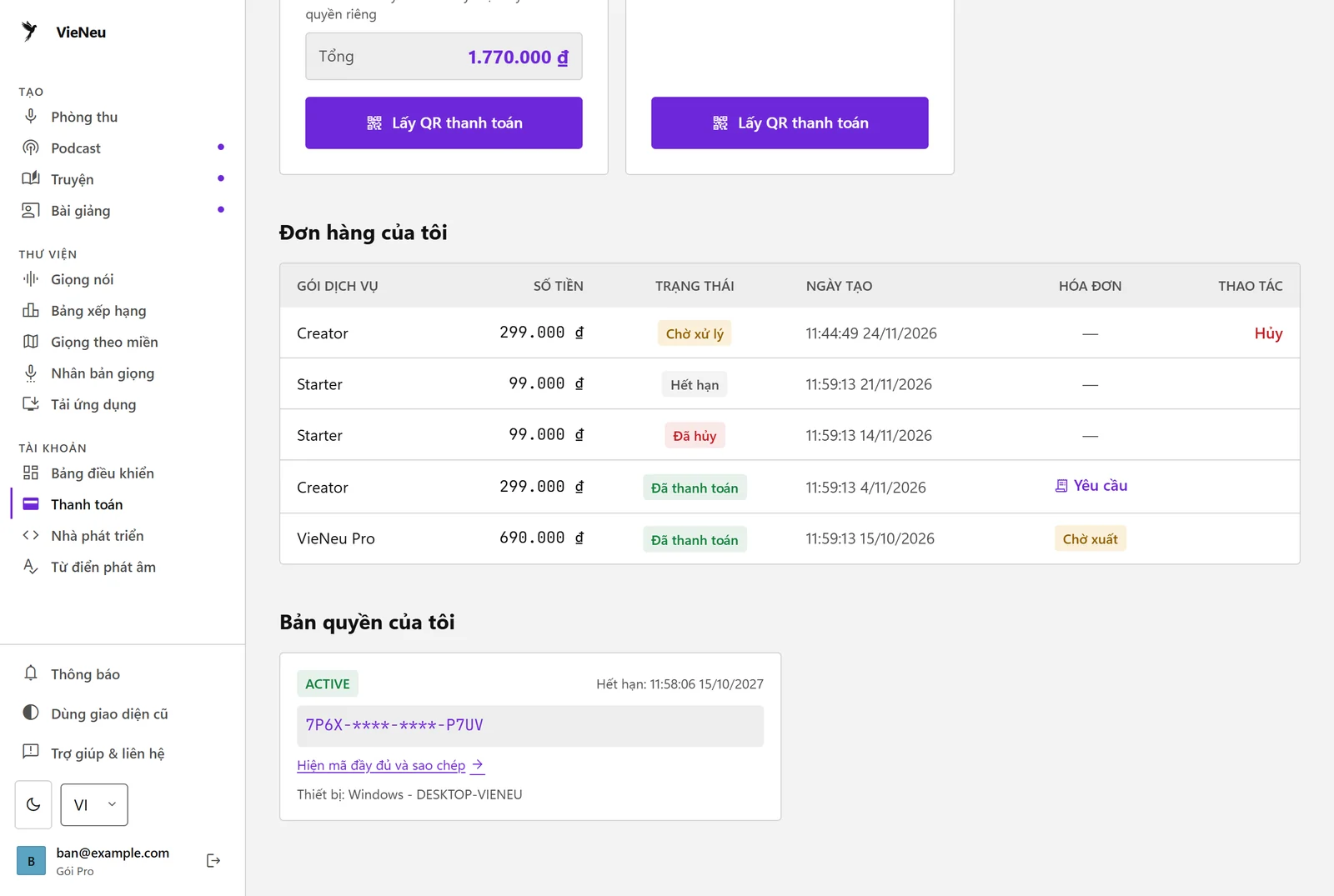
Go to Billing, scroll to My Orders (Đơn hàng của tôi) and look at the Status (Trạng thái) column:
- Paid (Đã thanh toán): the package is active. Reload the page to see the new balance.
- Pending (Chờ xử lý): VieNeu has not received confirmation that the money landed. Wait a few more minutes, then reload.
- Expired (Hết hạn) or Cancelled (Đã hủy): the order is closed (see below).
-
If you paid and the order stays Pending for too long, or has turned Expired, message the VieNeu team through the support button. Include:
- the email of your VieNeu account;
- the package name and the amount you transferred;
- the time of the transfer;
- a screenshot of the receipt in your banking app, with the transfer description visible.
The VieNeu team matches the transaction and sorts out the order for you.
Why did my order expire? An unpaid order expires on its own after about 20 minutes. Clicking Proceed to Payment for a new order also closes your older pending orders. Money sent after an order has expired, or sent with the wrong amount or description, may not match the order automatically. The VieNeu team then handles it by hand.
To stay out of trouble:
- Pay only for your latest order, and pay as soon as SePay's page opens.
- Once you have paid, do not pay again or create a new order for the same package. Message support instead.
You forgot the transfer description
Scanning the QR code on SePay's page is the safest way, because the code already holds the description. If you transferred without the description, or changed it, the system cannot recognise the payment by itself. Do not transfer again. Message the VieNeu team through the support button with the receipt and the details listed above.
Coupons
Type the code into Coupon code (Mã giảm giá) and click Apply (Áp dụng). The field is in the Confirm your order box. On a computer, it also sits right on the package card. A valid code recalculates the amount at the discounted price.
Each code has its own conditions. When a code does not apply, the line under the field says why:
| Message | What it means |
|---|---|
| Code … only applies to … | The code works only on the packages named. Pick one of them. This message used to appear in raw English as "This coupon is not applicable to the selected package". |
| This code doesn't apply to this package. | The code cannot be used on the package you picked. |
| This code doesn't exist. Check the spelling. | The code is mistyped or does not exist. |
| This code has expired. / This code can be used from … | The code is outside its valid dates. |
| This code has run out of uses. | All of the code's uses have been taken. |
| You've already used this code … | Each account can use this code only a set number of times. |
| This code is no longer active. | The code has been switched off. |
Some purchases take no coupon at all:
- Packages under Education pricing (Giá giáo dục).
- Packages priced per seat.
When you upgrade, the coupon comes off what is left to pay after the prorated credit. If an order with a coupon is cancelled or expires unpaid, the coupon use is given back.
VAT invoices
VieNeu issues electronic VAT invoices to both companies and individuals. Ask for one in either of two ways:
- When you buy: tick I need a VAT invoice in the Confirm your order box. After you pay, the invoice form opens by itself on the result page.
- After you buy: go to Billing and, in My Orders, click Request (Yêu cầu) in the Invoice (Hóa đơn) column of the order. Only Paid orders have this button.
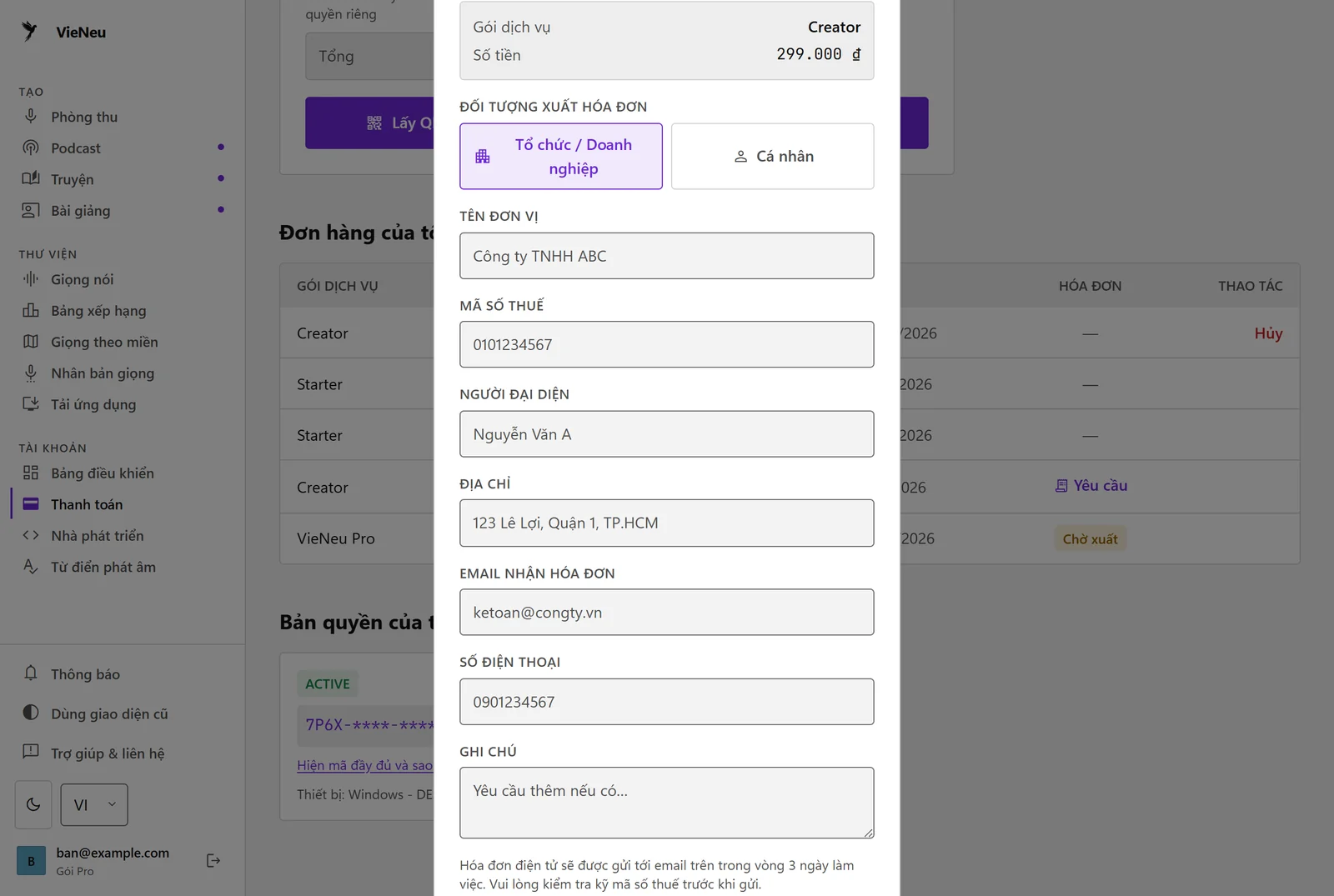
In the Request a VAT invoice (Yêu cầu xuất hóa đơn) form, choose Invoice made out to (Đối tượng xuất hóa đơn):
- Company (Tổ chức / Doanh nghiệp): fill in Company name (Tên đơn vị), Tax code (MST) (Mã số thuế, 10 or 13 digits) and Representative (Người đại diện).
- Individual (Cá nhân): fill in Buyer name (Họ tên người mua) and Citizen ID number (CCCD) (Số căn cước công dân, 12 digits).
Then fill in Address (Địa chỉ) and Email to send the invoice to (Email nhận hóa đơn). Phone number and Note are optional. Click Send invoice request (Gửi yêu cầu xuất hóa đơn). The e-invoice goes to the email you entered, so double check the tax code or citizen ID number before sending.
The Invoice column shows where your request stands:
| Label | What it means | Can you edit it? |
|---|---|---|
| Requested (Chờ xuất) | VieNeu has received the request. | Yes. Click the label to edit. |
| In progress (Đang xử lý) | Accounting is issuing the invoice. | No. Message support if something must change. |
| Issued (Đã xuất) | The invoice has been emailed. | No. |
| Rejected (Bị từ chối) | The invoice could not be issued yet. Hover over the label to see why. | Yes. Fix the details and send again. |
| Cancelled (Đã hủy) | The request was cancelled. | Yes. |
Cancel an order
An order still Pending has a Cancel (Hủy) button in My Orders. Only cancel an order you have not paid. If you have paid, do not cancel it: message support as described above.
If you go back or cancel on SePay's page, that order is cancelled and you are not charged.
Troubleshooting
| What you see | What to do |
|---|---|
| You paid and the page says Confirming your payment… | Keep the page open; it updates once the money lands. Click Check now (Kiểm tra lại ngay) if you like. Do not pay again. |
| The order is still Pending, or Expired, although you paid | Message support with your account email, the package, the amount, the transfer time and a receipt screenshot. See above. |
| You forgot or mistyped the transfer description | Do not transfer again. Message support with a receipt screenshot. |
| The coupon says it "only applies to …" | Pick one of the packages it names. See Coupons. |
| "Could not start the payment. Please try again." | Try again in a few minutes. If it keeps failing, message support. |
| You requested an invoice but no email arrived | Check the label in the Invoice column. If it says Issued and there is no email, check your spam folder, then message support. |
| Still stuck | Click the support icon in the bottom-right corner of the page to message the VieNeu team. |