Pauses, speed, volume and pronunciation
This page collects the ways to shape how the Studio reads: add pauses, change the speed, insert a laugh or a sigh, and teach VieNeu to read abbreviations, jargon and numbers correctly.
The screenshots show the Vietnamese interface. Button names are given in English first, then in Vietnamese in brackets.
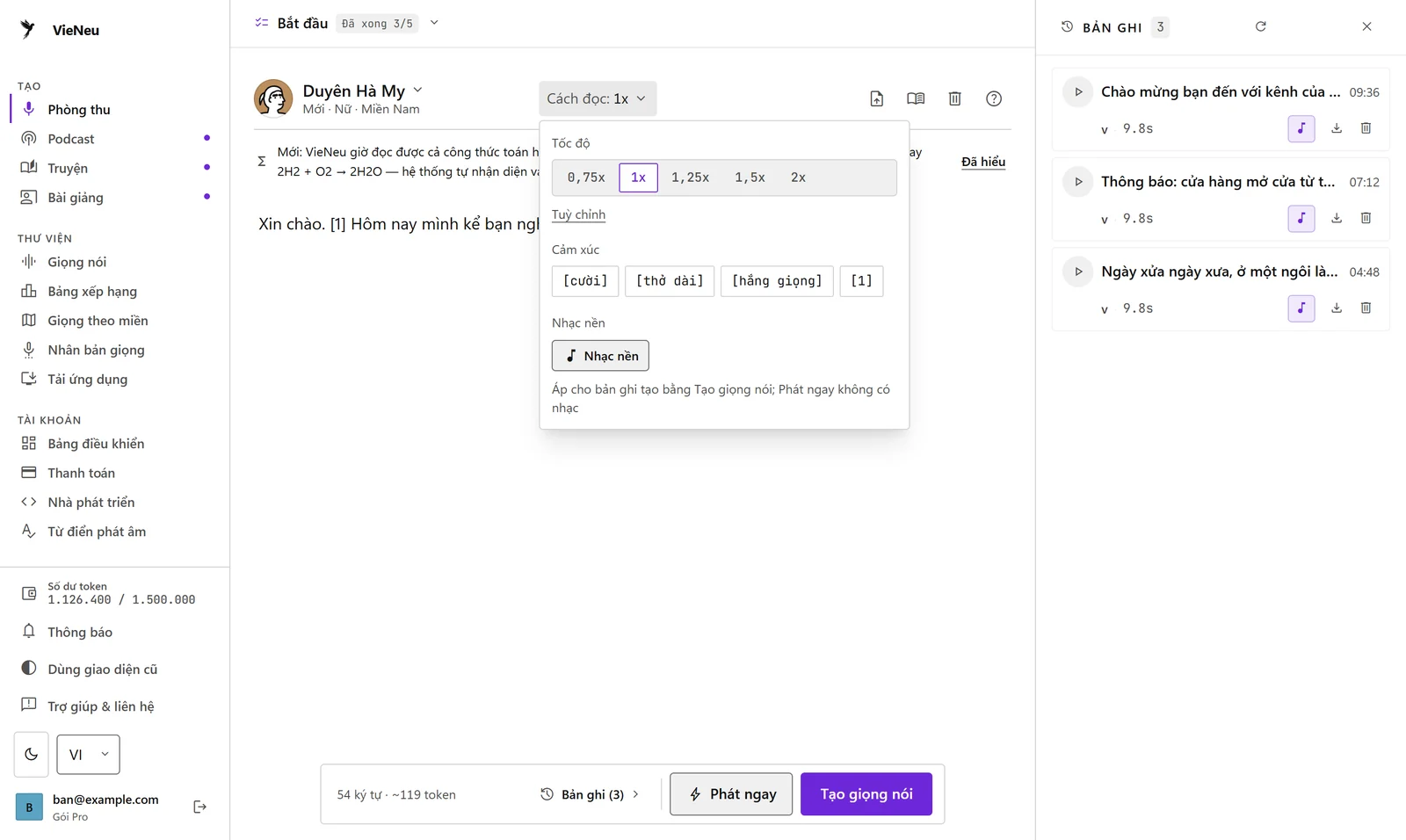
Most of it lives in the Reading (Cách đọc) menu in the top bar of the Studio. The button shows the current speed, for example Reading: 1x (Cách đọc: 1x). On a phone it is just a slider icon.
Add pauses
Type a number in square brackets where you want a stop. The voice stays silent for exactly that many seconds there:
Chương một. [2] Ngày ấy, tôi còn rất nhỏ. [0.5] Nhà tôi ở cuối làng.
[1]is a 1-second pause,[0.5]half a second.[1,5],[1.5s]and[2 giây]work too.- Each tag is at most
[10]. For longer, put tags side by side:[10][10]is 20 seconds. A tag above 10 is skipped, and the Studio shows a note with a one-click fix. - Quick insert: open Reading, then click the
[1]button under Emotions (Cảm xúc). The classic design labels it Pause 1s (Nghỉ 1s). The tag goes in at the cursor; change the number as you like. - Pause tags work in the Studio, Story, Podcast and through the API.
- On the Story page, the Gap (Khoảng lặng) slider sets the silence placed between parts when you export the story.
A line break or an ellipsis does not guarantee a long pause. To be sure of a stop between two sentences or paragraphs, use a pause tag.
First word cut off when it plays? Put a short pause tag at the very start,
for example [0.5] Xin chào các bạn…. The file then has half a second of silence
before the first word.
Change the reading speed
Open Reading and pick a preset under Speed (Tốc độ): 0.75x, 1x, 1.25x, 1.5x or 2x. For another value, click Custom (Tuỳ chỉnh) and drag the slider, from 0.5x to 3x in steps of 0.05.
The voice is always generated at its natural pace, then sped up or slowed down (keeping the pitch). So the further the speed is from 1x, the less natural it can sound. If 1x is a little fast but 0.9x already sounds odd:
- Try 0.95x (click Custom).
- Keep 1x and add short pause tags such as
[0.3]between sentences for a calmer pace. - Try another voice: each voice has its own natural pace.
On the Dubbing page, each subtitle line has its own speed box.
Add emotion: laughs, sighs…
Open Reading and look under Emotions. Each button there is a tag, such
as [cười] (laugh). Click one to insert it at the cursor:
Vui quá [cười]! Thôi được rồi [thở dài], mình làm lại từ đầu.
The buttons under Emotions are the complete set of tags the current voice engine can perform. The set can change, so check the menu rather than a copied list. A bracketed word that is not in the set is dropped, not read aloud.
Through the API: call GET /v1/emotion-tags to get the same list (see the
API reference).
Volume
VieNeu has no control to make the voice louder. If a file sounds quiet:
- Turn up the volume on your device or player.
- Download the file and raise the volume in the audio editor you already use.
When you add background music (the Add background music button, Chèn nhạc nền, on a recording), the Voice volume (Âm lượng giọng) slider can only lower the voice, from 0 to 100%. If the music drowns the voice, lower Music volume (Âm lượng nhạc) instead.
Teach VieNeu to read it right: the Pronunciation dictionary
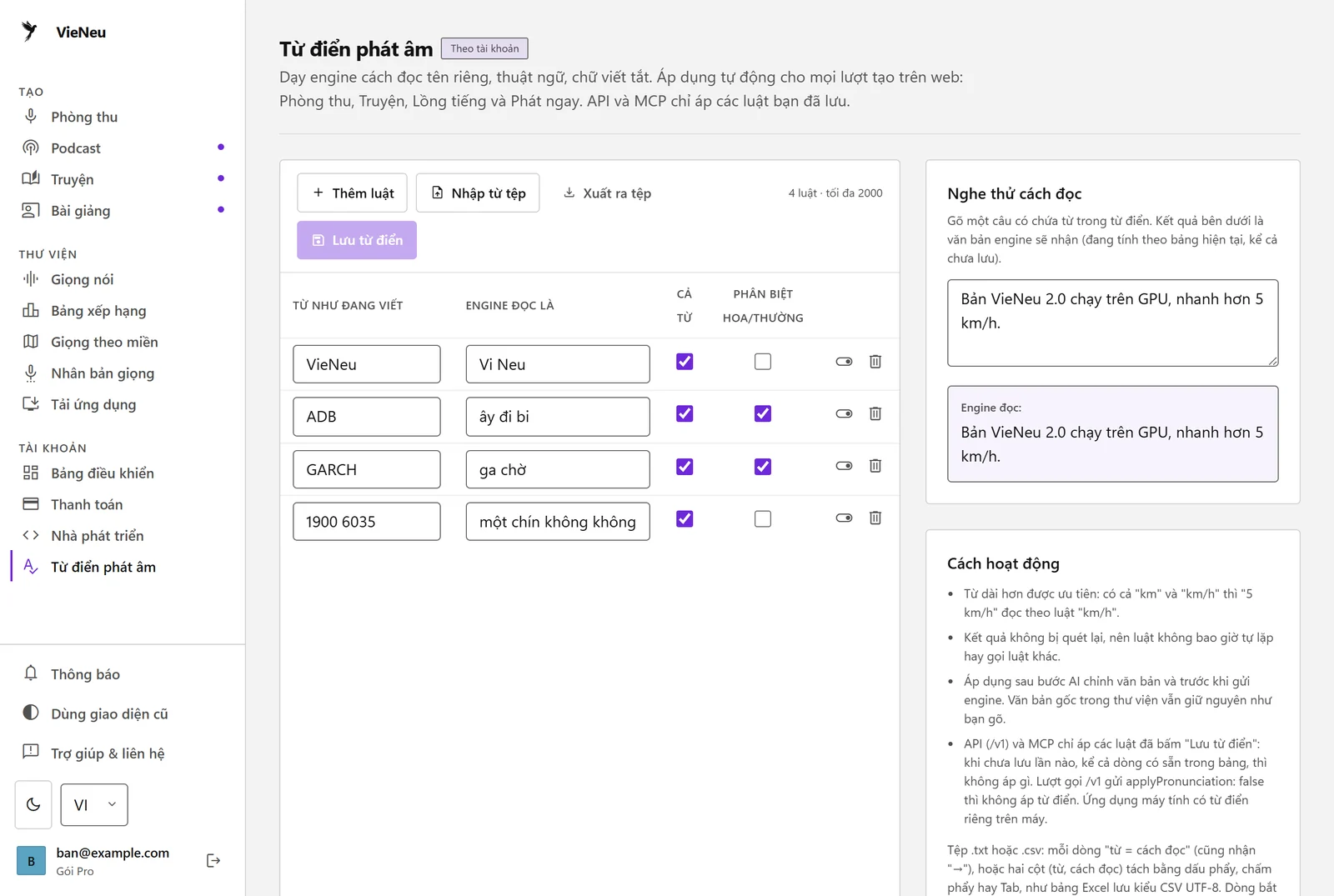
Use the Pronunciation dictionary (Từ điển phát âm) when VieNeu misreads a name, a term, an abbreviation (ADB, OLS, GARCH…) or a specific number. Each rule says: when you see this, read it like that. Rules apply automatically to every generation on the website: Studio, Story, Dubbing and instant play.
- Open the Pronunciation dictionary: click Pronunciation (Từ điển phát âm) in the Account (Tài khoản) group of the left sidebar, or the Dictionary (Từ điển) button, a book icon, in the Studio's top bar. On a phone it is in the three-dot menu.
- Click Add rule (Thêm luật).
- In Written as (Từ như đang viết), type the text as it appears, for
example
ADB. - In Read as (Engine đọc là), type how it should sound, spelled in
Vietnamese, for example
ây đi bi. - Options:
- Whole word (Cả từ): only replace it when it stands alone as a word (on:
a
kmrule leaveskmhalone). - Match case (Phân biệt hoa/thường): on makes
AIandaidifferent words.
- Whole word (Cả từ): only replace it when it stands alone as a word (on:
a
- Type a test sentence in Preview the reading (Nghe thử cách đọc). The Engine reads: (Engine đọc:) line shows the text the voice will receive.
- Click Save dictionary (Lưu từ điển). Unsaved rules are not used when you generate.
Good to know:
- With both a
kmand akm/hrule,5 km/hfollows the longer one. - The original text in your library stays exactly as you typed it. Rules only change what is sent to the voice.
- Already have a list in Excel? Click Import file (Nhập từ tệp) and pick a
.txtor.csvfile with oneword = readingper line, or two columns (word, reading). In Excel, save as CSV UTF-8 so the Vietnamese letters survive. Export file (Xuất ra tệp) makes a backup. - Through the API and MCP, only rules saved with Save dictionary apply.
Reading phone numbers and OTP codes
If VieNeu reads a number the wrong way (for example 1900 6035 as one big
number), you have two options:
- Write the reading in the text, in words:
một chín không không, sáu không ba năm. - Add a rule to the Pronunciation dictionary if the number comes up often:
Written as
1900 6035, Read asmột chín không không, sáu không ba năm.
For an OTP code, write each digit as a word, separated by commas, for example
Mã của bạn là: bốn, bảy, hai, chín. To space the digits out more, put a short
pause tag such as [0.3] between them.
Troubleshooting
| What you see | What to do |
|---|---|
| The voice runs sentences together without stopping | Put a pause tag such as [0.5] or [1] where you want the stop. |
| A pause tag does nothing | Check that the number in brackets is 10 or less. For longer, stack [10][10]. |
| The first word is cut off | Add [0.5] at the very start. |
| 1x is fast, 0.9x sounds odd | Try 0.95x under Custom, or keep 1x and add pause tags between sentences. |
| The audio is quiet | VieNeu has no control to make the voice louder. Turn up your device, or raise the volume in an audio editor after downloading. |
| An emotion tag has no effect | Use only the tags listed under Emotions in the Reading menu. Other tags are dropped. |
| A rule is added but the word is still misread | Click Save dictionary. Check that Whole word and Match case fit how the word is written in your text, then test it in Preview the reading. |
| Still stuck | Click the support icon in the bottom-right corner of the page to message the VieNeu team. |